Your agents. Your machines.
Magnum runs Claude Code, Codex and Pi in parallel on your Mac and your own servers. Hand it a task: it fans the work out across your machines, keeps going after you close the laptop, and brings it back as one change to review.
curl -fsSL https://magnumade.com/macos/install.sh | bash
Magnum 0.98.0 beta for macOS on Apple silicon and Linux on x86_64 and arm64. Free, no account. Download the .dmg
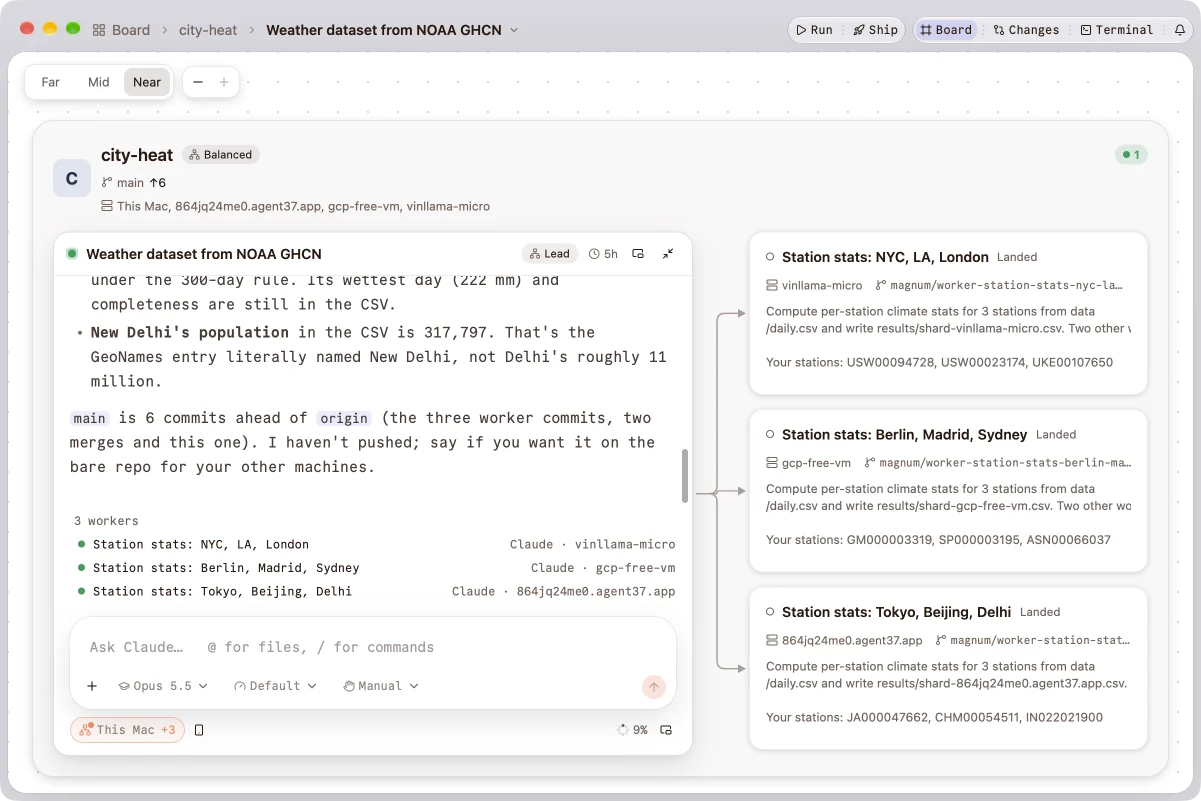
One task, three servers, four minutes.
A real run, filmed in Magnum. A lead session on a Mac split a climate-stats job over nine cities’ weather records across three servers. Each worker landed its commit, and the lead joined the results 3 minutes 59 seconds after the split, for about $2.
Delegate. Fan out. Land.
-
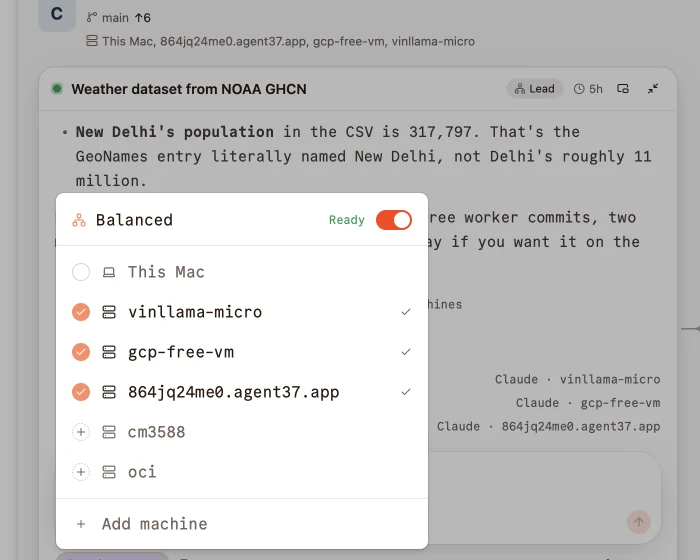
Delegate
Tell a lead session what you want and tick the machines to use. Magnum gets each one ready: it connects, copies the project, and asks only what’s yours to decide.
-
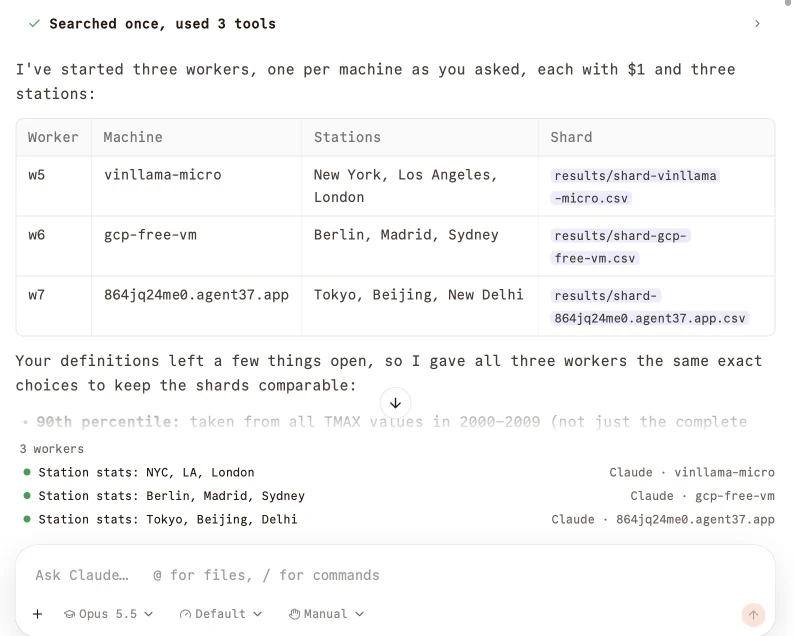
Fan out
The lead splits the job into workers across the machines you ticked. Each worker gets its own worktree and branch, and runs Claude Code, Codex or Pi.
-
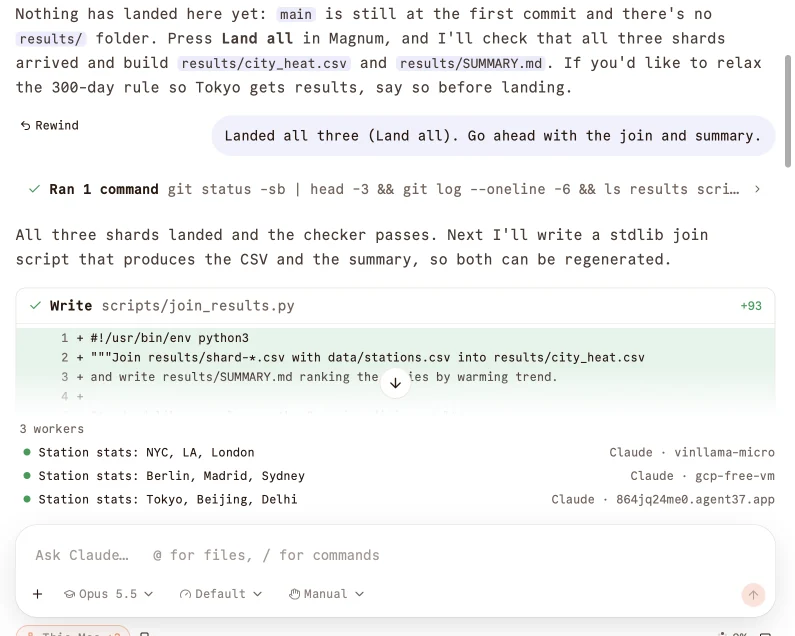
Land
A worker whose check passes lands back on the lead’s branch by itself. Land all brings in the rest, and you review one change.
Close the laptop. They keep going.
Agents run in Magnum’s node on each machine, not in the app’s window. Quit Magnum, lose the Wi‑Fi, take the flight home: the agents on your servers keep working, and Magnum picks them up when you’re back, questions included.
Nothing ends an agent for being quiet, so a migration can run all night.
- You quit Magnum and go home.
- Codex on build-box: tests pass, 14 files changed.
- Claude on build-box asks to run the migration.
- You open Magnum. Both sessions are back, one waiting for you.
Any machine you can SSH into.
Add a server and Magnum puts one small binary in your home folder there: no sudo, no open ports, your ~/.ssh/config as it is. It finds the agents already installed, or offers to install Claude Code, Codex or Pi. From then on, that server’s projects and sessions sit beside your Mac’s.

One project on every machine
The clone on your Mac and the one on the server show as one project. Set it up on a new machine in one step, with your unpushed commits and uncommitted changes.
Continue on a bigger machine
Move a session mid-conversation. The agent picks up where it left off, whether it’s Claude Code, Codex or Pi.
A worktree per task
Each session can start in its own worktree and branch, with your .env and setup, so agents don’t step on each other. Land merges it back.
Bring the plans you already pay for.
Magnum runs each agent’s own CLI with its own sign-in. No credits, no resold tokens, nothing between you and your provider.
Claude Code
Your Claude plan or an Anthropic API key, or any Anthropic-compatible endpoint: OpenRouter, DeepSeek, Qwen, GLM, Kimi, MiniMax, and local models through Ollama.
Codex
Sign in with your ChatGPT plan, here or on a server: Magnum forwards the sign-in page’s callback to the machine Codex runs on.
Pi
Any provider Pi supports, signed in through Magnum on whichever machine it runs. Its skills, prompts and MCP servers show in Magnum’s library.
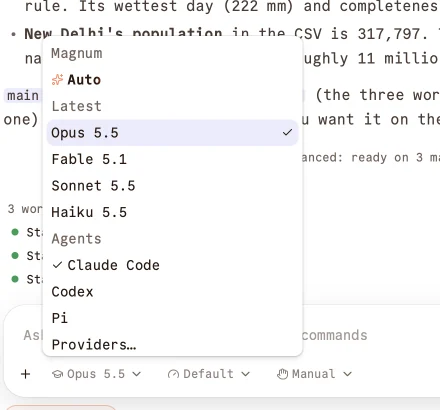
Magnum Router
Set the model to Auto and Magnum picks the model and effort for each message, and tells you why: a quick question to a fast model, a wide change to the strongest.
The whole fleet in one window.
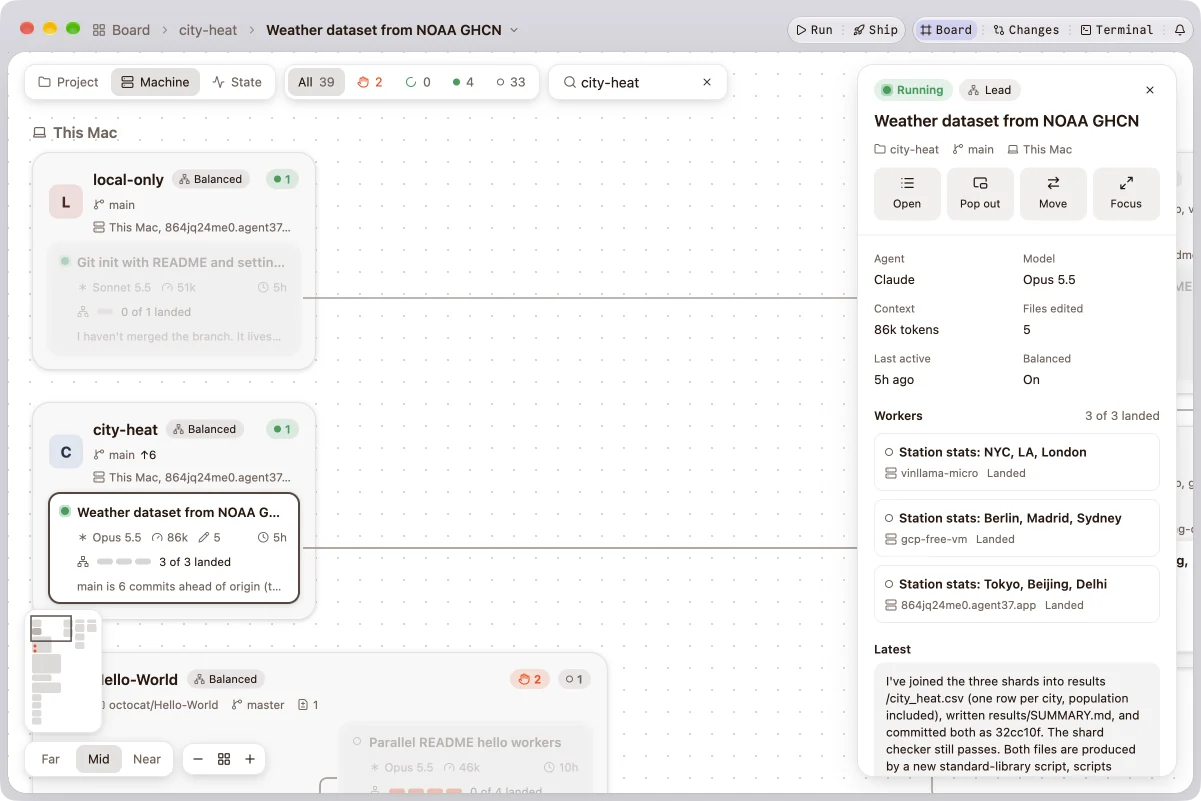
Every session on every machine says whether it’s working, waiting for you or done: in the sidebar, the menu bar and notifications. The Board lays out every project at once, each lead beside its workers. Control lists every run with what it spent and what’s waiting on you, and approvals come with the diff, so a yes takes a glance.
Everything around the agent.
Changes and pull requests
What each session changed, staged and committed with a suggested message; push, publish and pull requests, with the PR beside the chat.
Files and terminals
The project’s files and an editor beside the chat, and terminals in a drawer, here or on the server.
Run and Ship
Run starts your project and shows it: a web app in a preview, a phone app on a simulator. Ship commits, tests and pushes, and asks you before the push.
Rewind
Take a session, and the files it changed, back to any earlier prompt.
Permissions and sandbox
Allow, ask and deny rules per project, and Claude Code’s OS sandbox when you want it.
MCP, skills and plugins
Every MCP server with its health, and the agents’ skills, commands and plugins in one library.
Currents
What needs you, from every project and machine, in one list, the menu bar and notifications.
Left running
Agents still running with no window on them, listed per machine, to reopen or stop.
Usage
What each agent spends, by day, model and project.
Keys stay yours
Provider keys in Keychain on macOS and Secret Service on Linux. Telemetry is anonymous and can be turned off.
Signed updates
Signed, notarized releases, verified before they install. Every machine’s node follows in place, and its agents keep running.
Magnum Guide
Every part of Magnum explained, in the app with ⌘? and on the web, with a tip a day and a short tour.
Native, not a web view.
Magnum is written in Rust and its window is drawn on the GPU: no Electron, no Node, and no server of ours between you and your agents.
How Magnum compares.
Magnum runs the agents you already use on machines you own, and talks to each over its own protocol instead of hosting its terminal. A lead session splits one task across several machines and lands the workers’ branches back after their check. It’s free, with no account and no server of ours in the path.
The others, as their own sites describe them in November 2026.
Questions.
What is Magnum?
An agentic development environment (ADE): a native app for running coding agents (Claude Code, Codex and Pi) on your Mac and on your own servers, from one window. It shows every session on every machine, keeps them running when the app isn’t, and handles the git around them: worktrees, changes, landing and pull requests.
How is it different from cloud coding agents?
Amp’s orbs, Capy and Conductor Cloud run agents on machines they host. Magnum runs the agents’ own CLIs on machines you already have, on the plans you already pay for, with no account and no server of ours in the path. See how Magnum compares.
How do I install Magnum?
On a Mac with Apple silicon, run curl -fsSL https://magnumade.com/macos/install.sh | bash in Terminal, or download the .dmg. On Linux (x86_64 or arm64), run curl -fsSL https://magnumade.com/linux/install.sh | bash. To use a server, add it in Magnum: it installs its node there over SSH.
Does it work with my Claude or ChatGPT plan?
Yes. Magnum runs each agent’s own CLI with its own sign-in: Claude Code with your Claude plan, an Anthropic API key or another Anthropic-compatible endpoint; Codex with your ChatGPT plan; Pi with any provider it supports. Magnum doesn’t resell tokens or sit between you and your provider.
Do I need an account, or a server of yours?
No. Magnum runs on your machines and talks to the agents directly. Your code and prompts go only to your machines and to the model provider each agent uses.
What does Magnum put on my servers?
One binary in ~/.magnum, running as your user: no sudo, and no ports opened, since everything goes through SSH. It keeps your agents running and serves the files Magnum shows. Your ~/.ssh/config applies as it does in a terminal.
What happens when I quit Magnum, or my laptop sleeps?
Agents on your servers keep working through both; Magnum picks them up when it reconnects. On a Mac, Magnum Helper keeps local agents running after you quit (they pause while the Mac sleeps); on Linux, Magnum’s node does.
Can I run several agents on one project at once?
Yes. Give each task its own worktree so they don’t step on each other, on the same machine or across machines, and land each one when it’s done. Or hand the whole task to a lead session and let it split the work.
Is it free?
Yes, Magnum is free to download and use. You pay your model providers as you do today.
Which platforms does it run on?
The app runs on macOS (Apple silicon) and Linux (x86_64 and arm64, glibc 2.35 or newer). Servers can be Linux or macOS machines you reach over SSH.
Put your machines to work.
curl -fsSL https://magnumade.com/macos/install.sh | bash
Magnum 0.98.0 beta for macOS on Apple silicon and Linux on x86_64 and arm64. Free, no account. Download the .dmg